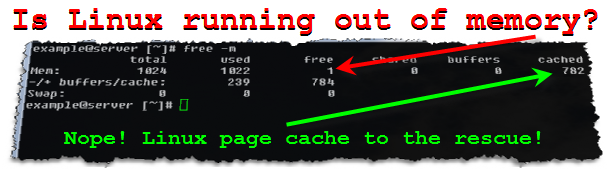
Check the amount of RAM usage with the commandfree:
free is the most common command to check Linux system memory usage. Shows information about total memory, used and free memory.
Usually, free is called with the -h option, which means to show the output in a human-readable format:
free -hOutput:
total used free shared buff/cache available Mem: 3936 1087 252 130 2596 2427 Swap: 0 0 0Meaning of each column:
- total – the total amount of memory that can be used by programs.
- used – Memory used.
- free – free/unused memory.
- shared – This column can be ignored. This is shown for backward compatibility only.
- buff/cache – combined memory used by core buffer and page and slab cache. This memory can be retrieved at any time if needed by applications.
- available – An estimate of the memory that is available to start new programs, without swapping.
The free command shows information about physical memory and system switching.
Check the amount of RAM usage with the commandtop:
top is a command-line utility that displays real-time information about running processes. It also shows a system summary, including memory usage.
To invoke the command, simply type top:
top
Output:
The output header contains information about the total, free and swapped physical memory of the system.
The %MEM column provides information about the share of available physical memory usage for each running process.
Checking the amount of RAM usage /proc/meminfo:
The easiest way to check the amount of RAM memory usage is to display the virtual content of the proc / proc / meminfo file. This file is used by free, top, ps and other system information commands.
Use less or cat to view the contents of the /proc/meminfo file:
cat /proc/meminfoThis file contains a lot of information about system memory and swap usage:
MemTotal: 4030592 kB MemFree: 401804 kB MemAvailable: 2507504 kB ...The information in the /proc/meminfo file can be parsed and used in shell scripts.
Check RAM usage with scriptps_mem:
ps_mem is a Python script that reports the amount of RAM memory used by each program. It works with Python 2 and 3 and can be installed with pip :
sudo pip3 install ps_memThis script requires admin privileges. To launch it, type sudo ps_mem in your terminal:
sudo ps_memThe output will contain the memory of each running program in ascending order:
Private + Shared = RAM used Program ... ۱۱٫۹ MiB + 20.2 MiB = 32.1 MiB nginx (4) ۸٫۲ MiB + 42.4 MiB = 50.6 MiB systemd-journald ۵۵٫۸ MiB + 307.2 MiB = 363.0 MiB php-fpm7.4 (6) ۲۳۳٫۹ MiB + 234.0 MiB = 467.9 MiB redis-server ۵۷۸٫۲ MiB + 578.6 MiB = 1.1 GiB mysqld --------------------------------- ۲٫۲ GiB ================================= This script is useful when you want to find out which running program is taking up most of your system memory.